

 Download for Mac
User guide · reference
How Hapi works
A practical reference for everything you can do inside Hapi — what to click, what to expect, and which settings change what. Skip the source code. This is the manual.
01
Getting started
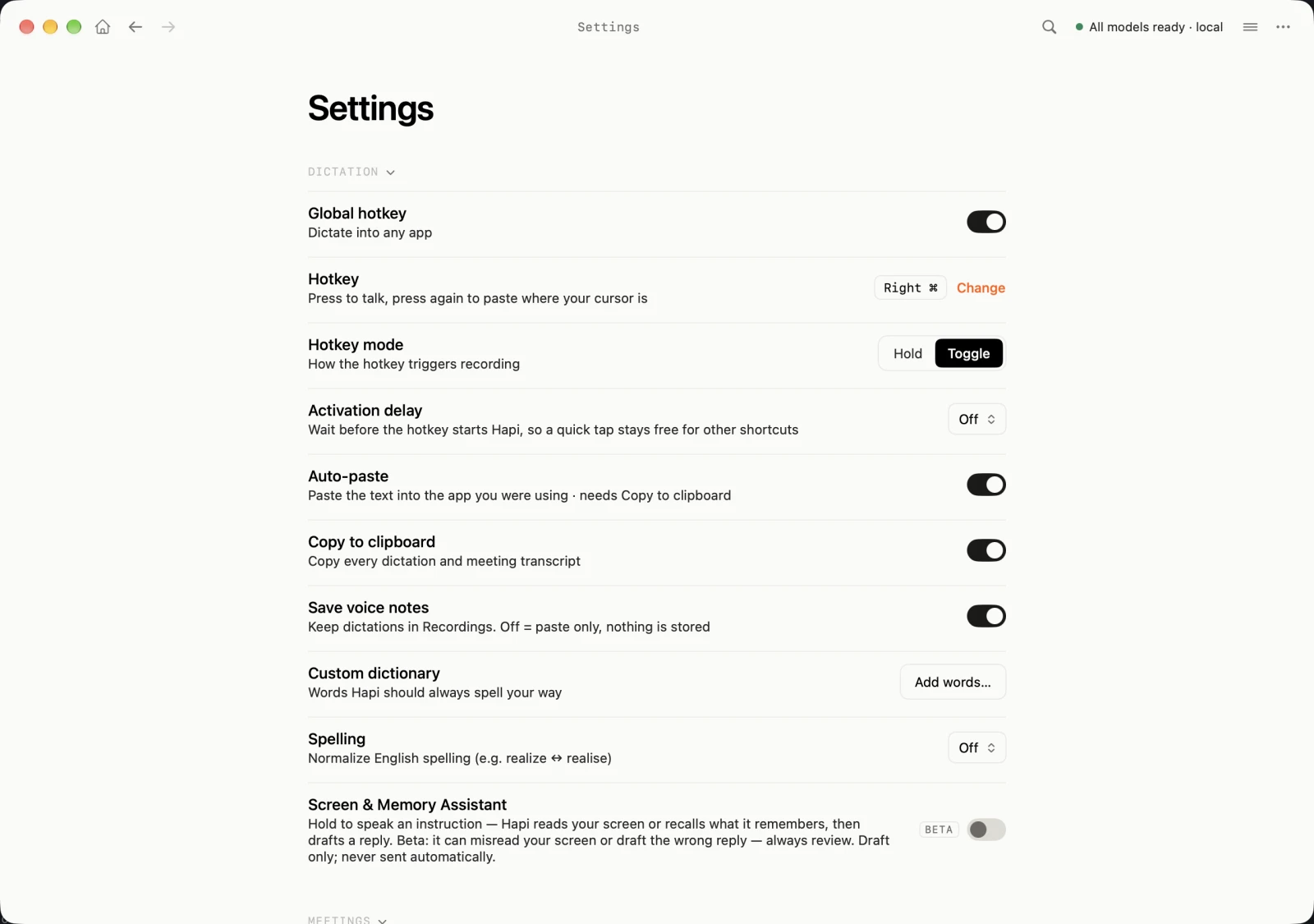
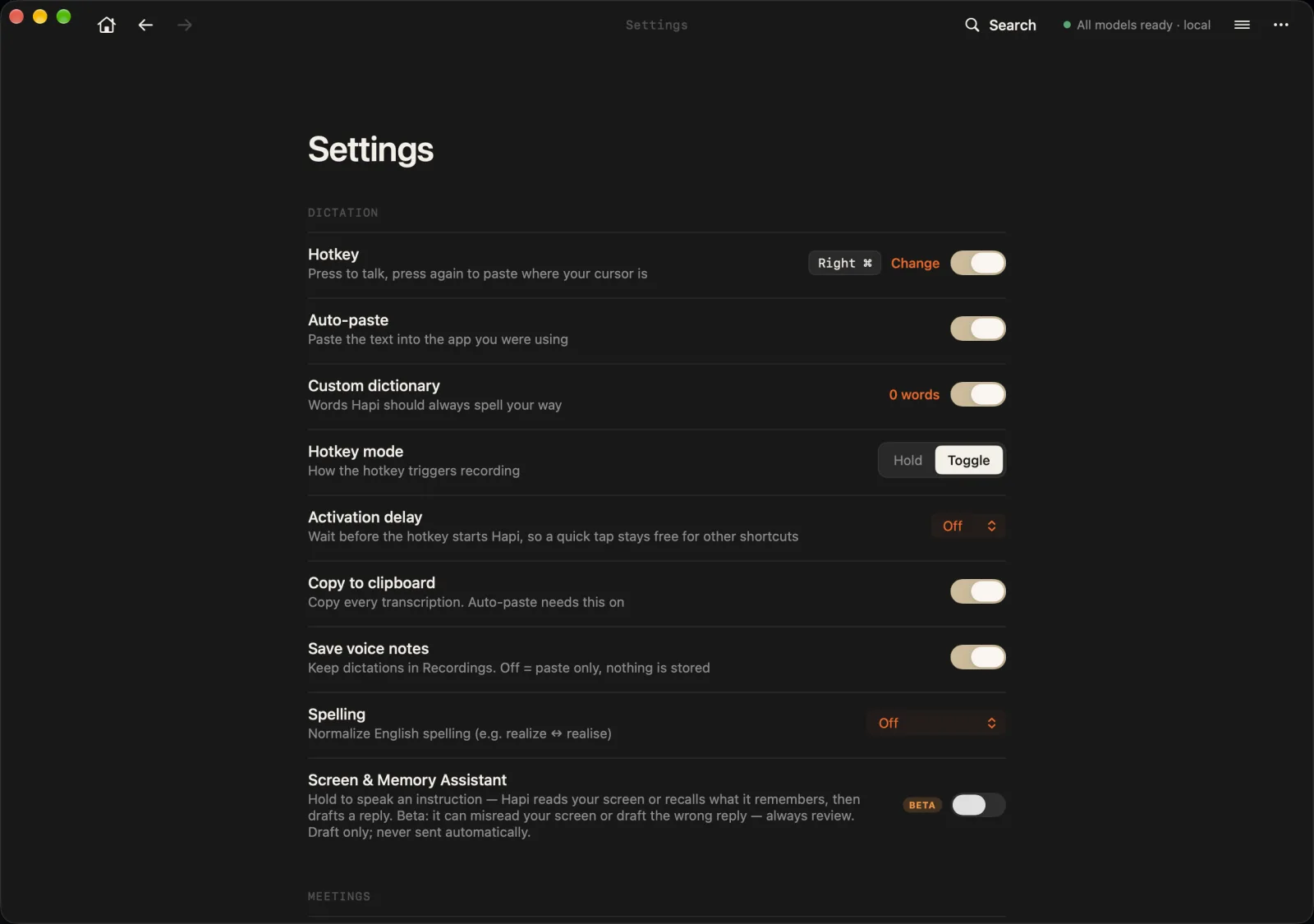
Hapi runs as a menu-bar app on macOS 14.2+. There is no dock icon by default — open the main window from the menu-bar icon, or hit your record hotkey from anywhere. Settings is a single page inside the main window — Dictation, Meetings, AI, Appearance, Permissions, System — with People, Integrations, Automations, Knowledge, and License one click deeper under More.
First-launch checklist
- Microphone access. Required for voice notes and meetings. macOS will prompt the first time you record.
- Accessibility access. Required for the global hotkey and for auto-paste. macOS asks once; you may need to restart Hapi after granting it.
- Screen Recording. Required to capture system audio from meeting apps and browsers. The first meeting you join triggers the prompt.
- Calendar (optional). Lets Hapi link recordings to events and generate pre-meeting briefings.
- Tell Hapi about you. In Settings → More → People → Your profile, add your name, email, role, and any context you want Hapi to use when it summarizes meetings or drafts follow-ups in your voice.
Your Profile
Your Profile
Name
Role
Company
Free-form context
Where to find things
- Today: the home note — a daily brief, your next meeting, a note for the day where you can @mention meetings and people, and today's recordings.
- Recordings: every meeting and voice note, grouped by date. Open it from the All recordings pill; start a new one with Record (⌘R).
- Search: ⌘K finds people, meetings, and notes from anywhere.
- Settings: one page — Dictation, Meetings, AI, Appearance, Permissions, System — plus People, Integrations, Automations, Knowledge, and License under More.
02
Voice notes
Hold the global hotkey, speak, release. Words stream back in under two seconds. By default the result is copied to your clipboard and pasted into whatever app you were in.
Changing your hotkey
Open Settings → Dictation, click Change next to the hotkey, and press the new combination. Modifier-only keys (⌘, ⌥, ⌃, ⇧) work too — Hapi defaults to Right ⌘ to keep your normal Command key free.
Hotkey
Enable hotkey
Use global keyboard shortcut
Current Hotkey:
Right ⌘ChangeClick Change to record a new hotkey. You can use modifier keys (⌘, ⌥, ⌃, ⇧) with any key.
Mode
How the hotkey triggers recording
Output behavior
Below the hotkey block, the same panel exposes how transcripts get to your other apps. By default Hapi copies the cleaned text and pastes it where your cursor is.
Output
Copy to clipboard
Replace clipboard with the cleaned transcript
Auto-paste
Send ⌘V to the focused app after recording
Speech enhancement
Remove fillers, fix punctuation, capitalize
Settings reference
03
Meetings
When you join a meeting in Zoom, Google Meet, Teams, Slack huddles, WhatsApp, FaceTime, or any browser-based meeting on supported hosts, Hapi can detect it and offer to record. You can also start a recording manually from the menu bar for in-person meetings or phone calls.
Hapi
now
Meeting detected
Google Meet — “Q4 planning with Sarah”. Want to record?
What gets produced
- Transcript — full diarized transcript with timestamps and speaker labels.
- Title — short, factual title generated from the content.
- Summary — TL;DR plus a topic-by-topic breakdown.
- Action items — extracted with owner, due date when stated, and a link back to the moment they were said.
- Entities — people, companies, projects, and decisions mentioned, linked to existing profiles or queued for review.
Settings reference
Editing a finished meeting
Open any meeting from Today, Recordings, or ⌘K search to:
- Edit the title, summary, or any topic.
- Re-attribute lines to a different speaker.
- Mark, snooze, or complete action items.
- Turn the meeting into something else — a follow-up email, notes, or your own custom prompt.
- Append a follow-up recording to the same meeting; Hapi re-runs summary and entities on the merged transcript.
04
People & entities
Every meeting and note feeds a private knowledge graph of people, companies, projects, and decisions. Profiles live on your Mac; nothing is published, sold, or shared.
How learning works
- Extraction. After each transcript, Hapi proposes new entities and links to existing ones.
- Review queue. Proposals land in a queue you can approve, reject, or merge. Nothing enters your graph until you approve it (unless you turn auto-approve on for high-confidence matches).
- Edit any time. Open a person or company and edit their name, email, role, company, notes, or relationships. Changes propagate to past meetings.
- Merge or split. If two profiles refer to the same person, merge them. If one was wrongly combined, split them.
Review queue
Sarah Chen
PersonMentioned in 3 meetings · sarah@northstar.io (proposed)
Project Helios
ProjectMentioned 7 times across 2 meetings
Northstar Labs
CompanyLinked to 2 people · 1 meeting
Settings reference
05
AI provider
Hapi is local-first by default: a quantized Qwen model runs on your Mac and handles summaries, action items, titles, and entity extraction. If your machine is below the recommended 24 GB of RAM, or if you simply prefer to use a frontier model, you can route part of the pipeline to a cloud LLM through OpenRouter.
Provider Mode
Cloud mode (hybrid)
Use cloud LLMs for selected features. Audio and embeddings always stay on this Mac.
OpenRouter
API key
Stored in macOS Keychain. Never synced to iOS.
Require zero-retention
Only models with contractual no-logging are dispatched. Requests carry data_collection=deny.
Routes
Summary
Meeting summaries and TL;DR
Action items
Owner, task, due date extraction
Title
Short factual meeting titles
Entities
People, companies, projects
Usage this month
Spent
$3.20 / $25.00
Resets on the 1st. Click a route above to see per-route token counts.
Settings reference
What never leaves your Mac
- Raw audio recordings.
- The Parakeet speech-to-text model and its output.
- Diarization embeddings (ECAPA, WeSpeaker, Pyannote).
- Text embeddings (GTE) used for search.
- The SQLite database with your transcripts, entities, and history.
In hybrid mode, only the text Hapi chooses to send — the cleaned transcript or summary chunks for a given step — leaves the device, and only to the provider you authorized.
06
Integrations
Obsidian
Point Hapi at your vault and it will mirror new transcripts, summaries, and action items as Markdown files. You choose the folder, file naming, and which outputs to sync.
Claude Code
Hapi exposes an MCP server (search meetings, get a meeting, list action items, search entities, semantic search) so Claude Code can answer questions about your knowledge base from any project. See the MCP server page for setup and the full tool list.
Optional. When enabled, Hapi reads recent threads from a connected mailbox to link people to their email addresses, detect out-of-office replies, and flag decisions that have drifted between meeting and email. No mail content is sent to the cloud.
Calendar
Read-only access to your macOS Calendar so Hapi can label meetings with the event title, link recordings to invitees, and generate briefings.
Webhooks
Configure URLs to be called when a transcript is finished, when an action item is created, or when an automation sends to it. Useful for pushing into Notion, Linear, Slack, or your own pipeline.
07
Automations
Automations let you fire actions when something specific happens, without opening Hapi.
Triggers
- Transcription end — fires whenever a meeting or voice note finishes processing.
- Scheduled time — fires at a chosen time, daily or on specific weekdays. Useful for end-of-day digests.
- Keyword match — fires when a transcript contains a chosen word or phrase.
- Speaker detected — fires when a specific person is heard in a recording.
Actions
- Run a custom prompt against the transcript.
- Send the result to a webhook.
- Write a Markdown file to your Obsidian vault.
- Show a notification.
08
Semantic search
Regular search matches the words you type. Semantic search matches meaning. Look up “budget” and Hapi surfaces the calls where you discussed costs, pricing, and spend — even if no one ever said the word “budget”.
How it works
When you enable it, Hapi builds a small mathematical fingerprint (an “embedding”) of each meeting and voice note using a local model (GTE-Small, ~70 MB). Your search query gets the same treatment, and Hapi ranks results by how close their meaning is — not by keyword overlap. It runs alongside the usual exact-text search, so you get both.
- Find by topic, not phrasing — “hiring plan” finds the meeting where you talked about “growing the team”.
- Cross-meeting — surfaces related discussions across your whole history, not just inside one transcript.
- Fully on-device — embeddings are computed and stored locally. No text, audio, or vectors ever leave your Mac.
Turning it on
Semantic search is optional. Enable it in Settings → AI → Advanced → Semantic Search; Hapi downloads the embedding model once (~70 MB, ~200 MB RAM while indexing) and backfills your existing meetings in the background. New recordings are indexed automatically as they finish.
Privacy
Like transcription and diarization, semantic search is part of Hapi’s local-first core. It works the same whether you’re in local-only or hybrid mode, and the embedding model never touches the network after it’s downloaded.
09
Your data
Where it lives
~/Documents/Hapi/Recordings/— audio files.~/Library/Application Support/Hapi/transcripts.db— transcripts, summaries, action items, entities, and embeddings.~/Library/Application Support/com.hapi.transcription/— local models (Parakeet, Qwen).
Export
From any meeting or voice note: Export as TXT, Markdown, SRT, JSON, or CSV. From Settings → More → Integrations → Export All Transcripts you can dump your full library at once.
Delete
Delete a single transcript from its detail view, a person from their profile, or everything by removing the folders above. There is no remote copy to clean up.
iOS companion
The iPhone app records and transcribes locally on the phone, then syncs through your private iCloud account to your Mac. Recordings never touch our servers.
Still have questions?
Read the privacy policy, check the roadmap, or email hi@speakhapi.com.